


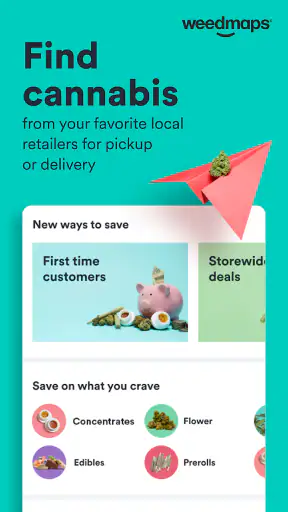
I approached Weedmaps: Buy Local Weed as a practical lifestyle app rather than a simple directory. Its main job is to help me explore nearby cannabis retailers, compare available products and deals, browse brands, and look for delivery options in places where those services operate. That makes it potentially useful, but the experience depends heavily on local availability, legal requirements, and how comfortable I am managing a purchase through a mobile screen.
The app is developed by Weedmaps and is free to install. It is intended for mature users aged 17 and over, which is important because this is not a general shopping app or a casual wellness catalog. I found the strongest value in the way it brings several steps together: discovering a store, checking what it carries, reviewing the practical details, and deciding whether pickup or delivery makes more sense. It can save time, although it does not remove the need to read carefully or verify the final details with the retailer.
Finding the right information without getting lost
Readability and navigation
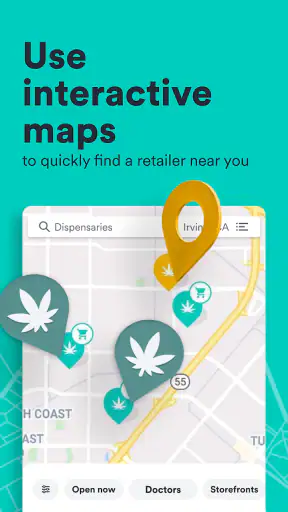
The first useful quality is the app’s focus. Instead of making me search the wider web for dispensaries and then open separate retailer pages, it gives me one place to begin. I can look through nearby options, move into a store’s product selection, and compare the choices that matter to me. That is a more direct workflow than relying on scattered search results, especially when I do not already know which local businesses serve my area.
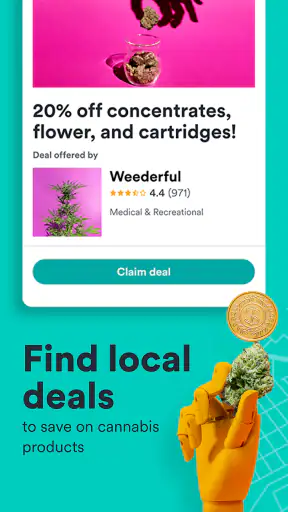
I also like that the experience is built around decisions rather than only discovery. A person may begin by asking, “What is near me?” but quickly need answers to more specific questions: Is there a product category I recognize? Is delivery available? Does the store have a current deal? Is pickup more convenient? Keeping those questions close together makes the app more useful than a static list of business names.
For readability, the most important habit is to slow down at the product and checkout stages. Deals and product cards can make browsing feel quick, but cannabis products often require attention to type, size, strength, form, and retailer-specific information. I would not treat a prominent discount as the main decision. I first narrow the product category, then inspect the listing, and only afterward compare the total value.
This is one of the app’s less obvious strengths: it can turn an unfamiliar local market into a shortlist. Someone who has just moved to a new area may not know which dispensaries are close, which ones offer delivery, or which brands are available nearby. Rather than calling several stores immediately, I can use the app to establish a starting point and then contact the retailer if a detail still matters.
At the same time, a marketplace interface can encourage too much browsing. There may be several similar listings, different retailers, and changing promotions. If I am tired, in a hurry, or using a small screen, the amount of choice can become a burden instead of a benefit. I get better results when I decide my priorities before opening the app: distance, delivery, product form, brand, or price. That simple step makes navigation more manageable.
Using search and store information thoughtfully
The app is especially helpful when I treat it as a comparison tool, not as an unquestionable source of truth. A listing gives me a useful picture of what a retailer says it offers, but inventory and promotions can change. Before making a trip, I would check the store’s current details and make sure the selected item is still available. This is particularly important when I am traveling a longer distance or choosing a product for a specific purpose.
For a regular customer, a repeatable workflow works well. I can begin with the closest suitable retailer, inspect its menu, compare a second option, and then choose between pickup and delivery. That is more efficient than opening every nearby store at random. I also recommend checking the complete order summary instead of judging only the advertised item, because delivery conditions and retailer rules can affect whether an apparently attractive option remains convenient.
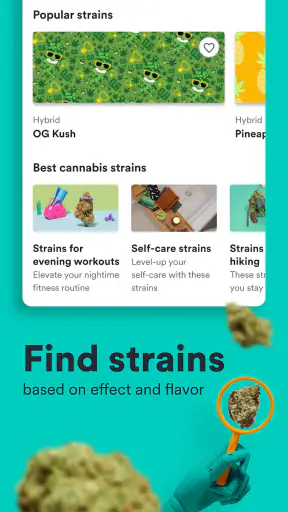
Another useful approach is to separate research from purchase. I can browse brands and product types when I have time, save my preferences mentally, and place an order later when I know exactly what I want. This reduces rushed decisions and helps me notice whether a deal is genuinely relevant to my needs rather than merely eye-catching.
Motor and sensory considerations
From an inclusive-use perspective, the app is most comfortable for people who can browse, tap, scroll, and read product details on a phone without much difficulty. The basic concept is straightforward, but shopping still involves repeated selection and review. Someone with limited fine-motor control may find small controls, long lists, or repeated scrolling tiring. I would use a larger device where possible, increase system text size if the phone supports it, and avoid trying to complete an order while moving or multitasking.
People with low vision may need to adjust display settings before relying on the app. Larger text, stronger contrast, and screen magnification can make product comparisons less demanding, although these tools cannot guarantee that every screen will remain equally easy to read. I would pay special attention to whether important details stay visible after enlargement. If a layout becomes awkward, checking the retailer through another channel may be less frustrating than forcing the entire process through one screen.
For users with color-vision differences, I would not rely on color alone to interpret a deal, status, or category. The safer approach is to read the accompanying words and confirm the actual product or order state. This is good practice for anyone, but it matters more when visual distinctions are difficult to perceive.
People who are sensitive to motion, clutter, or rapid visual changes may prefer a slower browsing style. I found that the app’s value comes from its information, not from rushing through the interface. Pausing between screens, opening one retailer at a time, and avoiding unnecessary back-and-forth can reduce sensory load. If the phone’s operating system offers reduced-motion or related display settings, those may also improve comfort, though their effect will depend on the device.
Motor access also affects delivery and pickup choices. Delivery can be more convenient for someone who has difficulty traveling, standing in line, or carrying a purchase. Pickup may be better for someone who wants a shorter interaction or does not want to wait at home. The best option depends on local availability and personal circumstances, so I would decide based on the whole trip rather than assuming one method is automatically more accessible.
Situational access in everyday life
A realistic example is an evening when I have limited energy and do not want to visit several dispensaries. I can open the app, review nearby retailers, compare the relevant menus, and see whether delivery or pickup is offered. If delivery is available in my area, that may remove a difficult journey. If it is not, the same search can still help me choose the closest suitable store and avoid an unnecessary detour.
Another situation is visiting an unfamiliar city or neighborhood. I may not know the local businesses, and general web searches can mix dispensaries with outdated pages or irrelevant results. The app gives me a more focused starting point for finding local options. I would still check location-specific requirements before traveling, especially if I am crossing municipal or state boundaries, because the app should not be treated as a substitute for understanding the rules that apply to me.
For someone who prefers privacy, mobile browsing can feel more discreet than asking several people for recommendations. That convenience has a trade-off: I am still using a digital service, and I should be comfortable with the account and ordering process before entering personal information. I would review the screens carefully and avoid placing an order on a shared device or public network if privacy is a concern.
The app can also help a caregiver or support person organize information, but I would be careful about consent and account access. If another person assists with reading, navigation, or transportation, it is better to agree on what they are helping with rather than casually sharing login details. Accessibility is not only about whether a button can be pressed; it is also about control, dignity, and making choices without unnecessary pressure.
For users who are deaf or hard of hearing, a visual shopping flow may be more convenient than relying on phone calls to locate products or ask about delivery. However, questions that are not answered in the listing may still require another form of communication with the retailer. Written contact, if offered by that business, can be preferable, but I would not assume every store handles communication in the same way.
People with cognitive disabilities or attention difficulties may benefit from setting a narrow goal before browsing. For example, I might decide to compare only two nearby retailers and one product category. That prevents the marketplace from becoming an open-ended stream of choices. I also find it useful to read the order summary aloud or review it once from top to bottom before confirming, because a short pause can catch an incorrect store, product, or fulfillment method.
Remaining barriers and practical friction
The largest limitation is that the app cannot make every local cannabis market equally convenient. The selection, delivery coverage, store information, and deals I see are tied to the area I am searching. A person in a well-served location may find it genuinely useful, while someone farther from participating retailers may see fewer practical options. That difference is not solved by the interface itself.
Inventory is another source of friction. A product can appear attractive during browsing and then become unavailable, or a deal may have conditions that matter at the final stage. I would avoid planning around a single listing when the purchase is urgent. Keeping a second retailer in mind is a small but valuable safeguard, particularly for people who have limited transportation or cannot easily repeat the trip.
Choice overload can also be an accessibility issue. A large menu may sound helpful, but it can make comparison harder for users with limited attention, reading fatigue, or decision anxiety. I would rather use a short list of meaningful candidates than scroll through every result. The app is at its best when I use it to reduce uncertainty, not when I expect it to make every decision for me.
There is also a boundary between product information and personal guidance. The app can help me find brands, retailers, and available items, but I should not treat marketplace browsing as medical advice. Someone managing medication, pregnancy-related concerns, a health condition, or a history of substance-use problems should speak with an appropriate professional before making decisions. In those situations, a health-focused source or direct professional conversation is more suitable than a shopping app.
Users who do not want to create an account, share location information, or manage an online order may prefer contacting a licensed retailer directly. Likewise, someone who already has a trusted dispensary and does not need price comparison may gain little from adding another layer. The app’s convenience is strongest when discovery and comparison are the problem; it is less compelling when those problems do not exist.
Age and legal context deserve equal attention. The app carries a Mature 17+ rating, and that should be taken seriously. I would use it only where cannabis activity is lawful, follow the retailer’s identification and purchase requirements, and avoid assuming that delivery or pickup rules are the same everywhere. Convenience should never replace responsible judgment.
How it compares with usual alternatives
The usual alternative is a search engine, followed by individual retailer websites, phone calls, or a walk through nearby stores. That approach can be better when I need a direct answer from one business or when a retailer’s own ordering system contains more detail. It can also be more comfortable for someone who dislikes marketplace browsing or wants to speak with staff before choosing.
Weedmaps is more useful when I am still deciding where to shop. Its advantage is the ability to explore local dispensaries, brands, deals, and delivery possibilities in one focused environment. Instead of beginning with a business name, I can begin with a need and see which nearby retailers appear relevant. That is a meaningful difference from a standard map listing, which may show location and contact details but not provide the same shopping context.
Compared with a retailer’s own app or website, the trade-off is breadth versus directness. A single-store service may offer a cleaner path when I already know exactly where I want to buy. Weedmaps makes more sense when I want to compare several options, but comparison introduces more screens and more responsibility to verify the final details.
The practical winner depends on the task. For discovery, local comparison, and checking whether delivery may be available, I would choose this app first. For a repeat purchase from a familiar store, I might go directly to that retailer. For health questions, legal interpretation, or personal advice, I would use a qualified professional or an authoritative local source instead.
Who will benefit most from the app
I think the app is a good fit for adults who want a clearer starting point in a new cannabis market, people who prefer to compare retailers before traveling, and customers who value delivery or pickup options. It is also useful for someone who wants to browse brands without visiting multiple stores in person. The free price makes trying it low-risk, although the real value depends on whether useful retailers appear in the user’s location.
I would recommend a deliberate setup: choose readable phone settings, search from the correct area, narrow the results, and inspect the complete product and fulfillment details before committing. If I were helping a friend use it, I would emphasize that the app is a shopping aid, not a guarantee of inventory, a substitute for retailer confirmation, or a source of medical advice.
The app has been available since Apr 18, 2010, and its current version is 9.80.0, with support beginning at Android 7.0. Its scale is reflected in an average rating of 4.7 from around 97 thousand ratings and more than 5 million installs. Those figures suggest that it has become a familiar option for many users, but popularity does not remove the local and personal limitations I encountered while assessing it.
My final view is positive but measured. Weedmaps makes the first part of cannabis shopping easier by bringing local discovery, product browsing, brand exploration, deals, and delivery searches into one place. Its inclusive value is strongest when I use it calmly, adjust my device for comfortable reading, and choose a workflow that matches my mobility, sensory, privacy, and attention needs. The best experience comes from treating it as a flexible research and ordering tool, not as an automatic answer to every access problem.
I would skip it if I already rely on one trusted retailer, if local listings are sparse, or if I need professional guidance rather than shopping information. For everyone else who wants to compare nearby possibilities before deciding, this is a practical lifestyle app worth trying. It does not eliminate every barrier, but it can reduce unnecessary travel, searching, and uncertainty when used with care.


